Cloud computing: Benefits and challenges
Introduction
Cloud computing has transformed the landscape of information technology by enabling users to access computing resources over the internet rather than relying solely on physical infrastructure. It provides services such as storage, servers, databases, networking, software, and analytics, allowing businesses and individuals to use and manage these resources remotely. The rise of cloud computing has brought numerous advantages that have reshaped industries and created new opportunities for innovation and growth. However, it also presents challenges that require careful planning and management to ensure that organizations can benefit fully from this technology while minimizing potential risks.
Cost Efficiency and Financial Flexibility of Cloud Computing

Traditionally, organizations needed to invest heavily in purchasing and maintaining on-site hardware such as servers and networking equipment. These capital expenditures could be substantial, and additional costs came with managing, cooling, and powering physical data centers. Cloud computing changes this model by offering a pay-as-you-go or subscription-based approach, where businesses pay only for the resources they actually consume. This shift helps organizations reduce upfront costs and convert capital expenses into predictable operational costs. Small and medium-sized businesses, in particular, gain access to advanced computing power and storage that might otherwise be unaffordable, enabling them to compete more effectively with larger enterprises.
Scalability and Elasticity in Cloud Computing
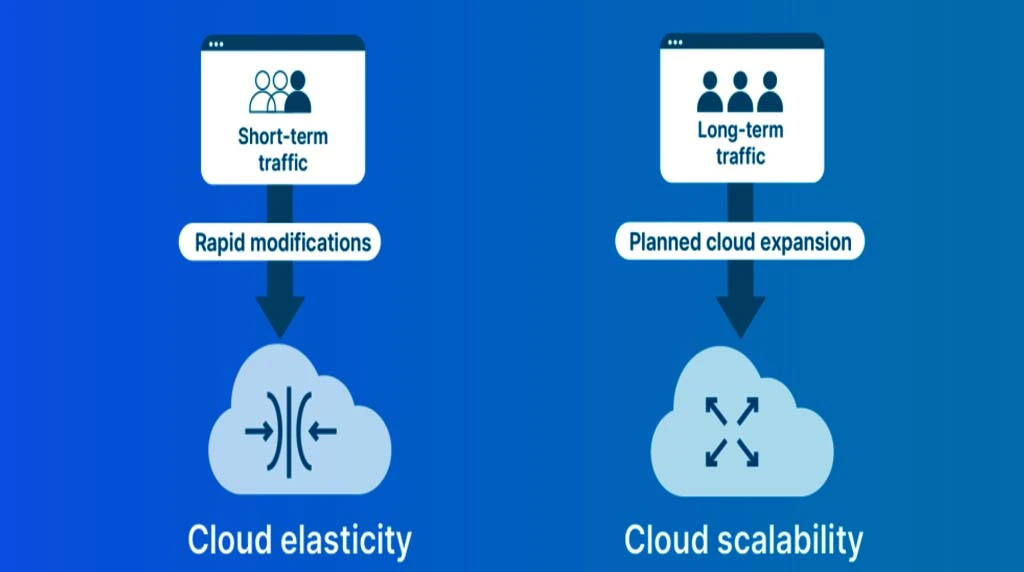
For instance, an e-commerce business can increase capacity during peak shopping seasons and scale down when traffic returns to normal levels. This elasticity allows businesses to respond quickly to market changes without the need for expensive and time-consuming upgrades to physical infrastructure.
Enhanced Accessibility and Collaboration through Cloud Computing

Cloud computing also enhances accessibility and supports collaboration. Employees can work from home, on the road, or from branch offices while accessing the same systems and data they would have at their primary office. Cloud-based collaboration tools enable real-time communication, file sharing, and project management, helping teams work together more efficiently regardless of geographical location. This level of accessibility and collaboration supports greater productivity and can lead to faster decision-making and problem-solving.
Security and Privacy Challenges in Cloud Computing
While leading cloud providers invest heavily in state-of-the-art security measures such as encryption, intrusion detection, and continuous monitoring, the fact that data is stored off-premises introduces new risks. Organizations worry about the possibility of data breaches, unauthorized access, and the challenge of ensuring compliance with data protection laws such as the General Data Protection Regulation (GDPR) or the Health Insurance Portability and Accountability Act (HIPAA). Companies must understand the shared responsibility model of cloud security, where the provider secures the infrastructure, but the customer is responsible for securing their data and user access. Implementing strong access controls, encryption strategies, and monitoring tools is essential to safeguard sensitive information.
Vendor Lock-In and Cloud Migration Challenges

Once an organization builds its applications and stores data using the tools and technologies of a particular cloud provider, migrating to another provider can be complex, expensive, and time-consuming. Each cloud platform has its own set of proprietary services, interfaces, and configurations that may not be easily compatible with others. This can limit flexibility and create dependency on a single vendor, potentially leading to higher costs or reduced negotiating power over time. To mitigate this risk, some organizations are adopting multi-cloud or hybrid cloud strategies, although these approaches can add complexity to management and integration.
Connectivity, Latency, and Performance Challenges in Cloud Computing

Cloud computing also relies heavily on stable and fast internet connectivity. If connectivity is slow or interrupted, access to critical applications and data can be affected, leading to operational disruptions. This is especially concerning for businesses operating in regions with unreliable internet service. Additionally, latency can be an issue for applications that require real-time processing or immediate responses, as data must travel between users and distant data centers. Organizations must consider these factors when designing cloud architectures, possibly incorporating edge computing or local caching to improve performance.
Compliance and Governance Issues in Cloud Computing

Finally, compliance and governance pose challenges for organizations using cloud services. Different industries and regions have specific legal and regulatory requirements regarding where data can be stored, how it must be protected, and how it can be transferred across borders. Organizations must ensure that their cloud deployments meet these requirements to avoid legal penalties, protect customer trust, and safeguard their reputations. This often involves working closely with cloud providers to ensure they offer the necessary certifications and data residency options.
Conclusion
These advantages have made it a central component of modern business strategies. At the same time, organizations must address challenges related to security, vendor lock-in, connectivity, and compliance to ensure that their use of cloud technology is both effective and secure. By carefully balancing these factors, businesses can harness the full potential of cloud computing to drive growth, innovation, and resilience in an increasingly digital world.
1. What is the difference between Public, Private, and Hybrid clouds?
Think of it like housing. Public cloud is like an apartment building (shared resources, managed by a landlord); Private cloud is a standalone house (dedicated solely to you); and Hybrid cloud is like having a main house but renting an extra room when guests visit (using your own servers but bursting into the public cloud when traffic spikes).
2. Is my data actually "safer" in the cloud than on my own computer?
In most cases, yes. Major providers invest billions in security that small businesses can’t afford. However, the “shared responsibility model” applies: the provider secures the infrastructure, but you are still responsible for securing your passwords and access permissions.
3. Does cloud computing require a constant internet connection?
Generally, yes. Since the processing happens on a remote server, your ability to edit or sync files depends on your connection. Some apps offer “offline modes” that sync once you reconnect, but the core “cloud” experience is internet-dependent.
4. What are IaaS, PaaS, and SaaS?
These are the three main service models:
- IaaS (Infrastructure): You rent the raw “bricks and mortar” (servers/storage).
- PaaS (Platform): You get the tools to build apps without worrying about the underlying OS.
- SaaS (Software): You just use the finished product via a browser (e.g., Gmail, Netflix, or Slack).
5. How does the cloud impact the environment?
It’s a double-edged sword. While large data centers consume massive amounts of electricity, they are usually far more energy-efficient than thousands of small, poorly optimized office server rooms. Most major providers are now committed to using 100% renewable energy.